About sixteen years ago, I met him for the first time. My trainwreck sibling brought home this adorable puppy he had no business adopting because he had not one thing in his life that wasn’t a mess. I was furious at my sibling – he didn’t even take care of himself, how could he drag
Read More
September 14, 2009
Being self-motivated while “between opportunities” has unique challenges; it’s a bit more complicated when health issues get a vote in what you do each day. As some of you know, I’ve been raring to move out, move on, and make serious career changes. All the get-up-and-go in the world doesn’t offset the physical considerations of an immune disease, though, so once again, I’ve had to make compromises.
When it’s too hot out, I just want to stay in a cool, slightly dark hole. With free wi-fi. Failing that, the library. When it cools down, I’m not as thrilled as I should be because the damp and chill get right into my bones. Still, it goes against the grain to let pain and grinding fatigue dictate my entire schedule, so I’m eating the ugliest frog today. For the next six hours, or as long as the energy lasts, this is the action plan.
We’ll start with discharging the internet obligations:
(while the laundry is in the wash)
1. Emails
2. Sign up for some courses online (anticipating huge reluctance here: it’s going to cost $1250 just for the classes.)
3. Finalizing a freelance contract.
All things I can do from the comfort of my desk, after which it’ll be on to the library to track down a textbook for that online class to save myself $26 (purchase) or $12 (renting from Chegg.com).
AND to make sure I don’t lose track of time again – every day feels like Saturday now – I’ve created a Google Calendar. It’s a departure from my usual obsessive pen-and-paper planner but it’s free, it’s lightweight 😉 and it fits my newly evolving lifestyle.
Bonus tasks: pick up the dry cleaning, grocery shopping.
How’s that for a SMART goal?
September 12, 2009
These are permutations of this question: How do you help others help themselves? Turns out, the answer can be quite simple: identify the appropriate resources and let them help themselves.
With the wealth of information and financial knowledge available online, I don’t buy financial advice books. There are a few “classics” or commonly discussed books that are constantly referenced, but they’re available at the library or through Paperback Swap, so it seems pointless for me to pay money for basic financial wisdom.
(Ramit would dispute this vehemently. But that’s not the point. The point is here, I’m agreeing with his premise that sometimes you should spend money to save money. Point also made on Consumerism Commentary’s podcast. So I guess you could read his post, listen to his commentary and skip this post. But you shouldn’t! Embarassing story ensues.)
This (perpetual and time-consuming) willingness to root for information, however, isn’t for everyone.
For those who are only interested in avoiding the biggest potholes but don’t yet know how to identify them, the exhortations of an exasperated PF blogger to “know your budget, understand your spending, run your numbers!” just doesn’t translate as constructive advice.
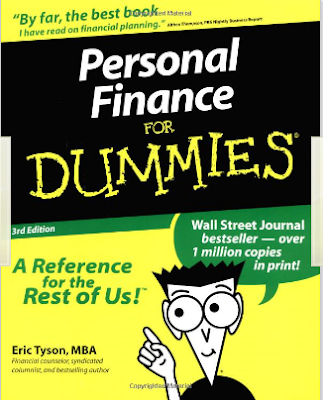
To fill that need, those black and yellow Guides for Dummies are good resources. I spent last weekend previewing the Mortgage for Dummies book because as an English major, I was skeptical of what seemed to be the Cliff Notes to money. The alternative, if the book didn’t pass muster, was to go dredge up more mortgage advice links and posts which weren’t terribly appealing in the first place. Plan B wasn’t looking too hot.
Happily, I was impressed at the concise and engaging writing. It wasn’t just my natural nerdiness and affinity for the material, either. After a few chapters, my non-blogger friend was moved to ask me questions about concepts raised in the book! Normally, this friend’s eyes sort of glaze over a bit when I start in on my really involved financial diatribes. You know, the “I’m watching football lalalaaaaa” kind of look?
For the record: I got to explain why people pay for points when shopping for a loan. In some situations, if you’re staying in the house long enough that your total interest paid is less than without paying for points (after factoring in the point cost) it’s worth it. That summary is pretty ok, but my original example didn’t clear things up, so I explained how I used the concept in a totally wrong and financially detrimental way.
When I bought my car *cringe* I made just about every mistake. I did negotiate and worked with the Fleet salesman instead of the floor salesman but that was about the only thing I did right.
Sensing blood, they presented a “pay for percentage” situation that only a total newb would fall for, and I did. *more cringe* They offered to knock a full percentage point off my interest rate, financed through a credit union they worked with, if I would pay an additional $1000 for GAP insurance. Since the car purchase was under duress (see Mistake #7) I wasn’t prepared for the cash expenditure, thus, easily freaked out about the prospect of having to make up the difference between my drive off the lot value and appraised value if anything happened to the car early on.
They preyed on my ignorance and created fear of a situation that actually isn’t impossible to bear. (Which is, btw, how most of them sell extended warranties and such.)
I should have considered the time horizon. The loan was written for 60 months even though I had no intention of taking that long. On the other hand, with all the financial turmoil at home, I also didn’t know how long I’d stay in that loan. Predictions would have been wild guesses. I signed the paperwork, went home, and privately committed to paying $500/month instead of $370. It was PIF in 3 years – that reduced one percent was not worth it. I don’t have the paperwork anymore, but roughly speaking, because I was dumb enough to roll that 1k into the loan, I paid 1k for the privilege of saving about $200. Yay me!
Back to the point: it’s good to know that there are smarter folks than I out there writing guides to help those who just don’t have the time for this kind of obsession. Simple writing is often the smartest writing.
There’s something to be learned there.
September 10, 2009
My usual glee at a) getting something in the mail, b) getting a new toy to install, and c) finally getting something to take care of this MESS was slightly dampened by the fact that I’m home to receive it ’cause I don’t feel good. Blech. I’ve leached out the grumpy, crabby commentary for your convenience.
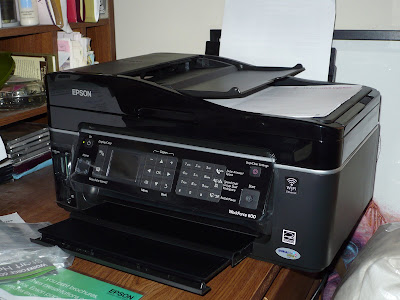 Yep, the plastic remains on the display panel. No, I don’t know if I’m taking it off. Doubt it, though.
 My desk is a bloody mess, so if you’d like to see a ton of photos, feast your eyes on this guy’s documentation of every single step. His was free (I think) – thus he has more responsibility on his plate, or at least a more complete review.
Set up: As long as you followed the instructions on the screen, with an occasional referencing of the manual, the set up is mild. The spiciest part is when you realize that you must use an Ethernet connection first to set up the wireless connection. Since my router is most inconveniently located a few rooms away, and this printer was h-e-a-v-y, having to set up an Ethernet cord for all of ten minutes made me crabby.
The installation guide naturally assumed that I’d have to manually confirm my network connection before beginning to scan, but that wasn’t the case at all.
My first test print, though, was horrifying. First of all, the printer/feeder is LOUD. I mean, startle you from a deep sleep loud. And it jammed up first thing with a hideous bone-like crunch.
Program installation: There were about four other programs, including some Arcsoft stuff that I’m unfamiliar with, that were downloaded early in the installation process. I might have to spend some time removing those later if it turns out they’re not essential to the printer’s basic functions.
First print page: After the mangled mess of a first test print page, I conducted my own test print. Apparently Epson’s only on board for one go at it – you’re to shut off the machine and free up the works before continuing, but the software just assumes everything was hunky-dory. My draft print of some text worked just fine, but again, the noise factor is rather unbelievable.
Be aware that draft print seems to be quite the ink saver as the text prints out gray and pixelated – they do indeed skimp on that setting. That’s fine. I’ll just go grayscale next time. I notice that the Properties screen also offers a “Quiet Mode” option, but I’m not sure what that means. Since I don’t have any immediate printing needs, that’ll have to wait for later.
On to the scanning!!
Scanning: My goals are to scan in all mailed documents as PDFs so that’s the setting on the LCD. Thus, to the Auto Document Feeder!
Test subject was a set of T-Mobile bills. The scanning process was very very slow. It asked for settings – which I prefer to customize at this time with each scan to be sure it goes where I want and does what I want. I skipped the preview option and went straight to scan. After feeding (or scanning from the screen) a box pops up asking if you want to Add Page, Edit Page, or Save File. I like this option – you can cram as many pages as you want into a file incrementally.
When you just Save File, it converts, and then sends the file to FineReader to “process,” then it savesto the file designated for these test scans.
The feeder is also quite loud, and slow: it feeds one page about half or a third as fast as a regular standalone fax machine, possibly slower.
The clarity is pretty decent at 300 dpi resolution, and it’s smart enough to rotate horizontally when it encounters landscape pages among the portrait. Not smart enough to differentiate between right side up or upside down, but that’s asking a bit much anyway.
Cost: Originally priced at $179, I wouldn’t have looked twice at this guy, but on sale at $129 and free shipping, decently priced OEM ink carts (though I will definitely look for better alternative pricing), I could deal. Wouldn’t call it a steal, but it may be worth the money.
Overall: Outlook is promising – I’ll revisit the issue in about three months to see how we’re doing on the printing and scanning. It was a bit of a waste to get a five in one for my purposes since I don’t intend to use the fax or photo printing options (ink is expensive!) but for a printer, scanner (with ADF) this best fit the profile.
September 9, 2009
Contact me for sponsorship opportunities at revanche.gs@gmail.com.
September 7, 2009

My original intent was to make this decadent recipe of French Garlic Prawns from Almost Bourdain.
The shrimp was on sale for $5/lb, and 3/4 lb was sure to provide enough to cholesterol and artery cloggage for any two people I know. Cooking plans kept getting thwarted though, by one social obligation after another, all involving eating out and never anything so good as to warrant posting. That may be the real tragedy here.
Eventually, though, the shrimp HAD to be cooked lest it become another hapless casualty of Food Forgotten in the Fridge. That many Fs cannot be good for anyone: wallet or hygiene.
To replace the lavishly buttery baked shrimp recipe, a quick search of the fridge yielded a host of other ingredients that simply begged to be used worthily. Almost a whole bag of salad greens went onto the plates, followed by fresh tomato wedges just in their prime.
The shrimp – oh heavenly pre-deveined shrimp! – were peeled and lightly dunked in boiling water for the exactly right 45 seconds. As soon as they turned pink, lost all their raw grayishness, they were swished once, and rescued from the water. A cold water bath later, the perfectly cooked shrimp were crisp and yielded a satisfyingly textured crunch when bitten into.
Tossed onto their salad bed. A swirl of olive oil, a squeeze of lemon, and quick grate of pepper.
Perfection.
All for under $10.
September 4, 2009

8 West Coasties: in aggregate, it feels like we could have financed the GDP of a small small country. (Or perhaps a small territory.) Let’s see if that’s true with some approximations.

Lodgings: $950
Variations: 1 night Fancy hotel+ 1 night Basic hotel/3 nights Basic hotel/2 nights Basic hotel shared room
Airfare: $2100
Variations: Mostly 1-stop flights, two nonstop returns.

Rental Cars: $600
The car itself was about $100 for 4 days, but parking at the hotel was insane at $30/day.
Friday Night out: $620
Those folks can really eat. And order way too much food. And drinks. — $250 dinner
Did you know that you could negotiate cover charges? My friend totally negotiated the bouncer at Bed down from $20/person to $30/pair. She tried for $20/pair but it didn’t work. That included open bar until midnight on certain drinks. And then some ambitious soul decided that rounds of Patron were a good idea. *dizzy* — $120 cover + $250

Saturday Wedding Day: $128
We only had time for one meal out and swimming at the hotel pool.
Sunday: $140
Brunch and gelato.
Misc (transportation, airport food): $300
Water was only slightly less ridiculously priced at $3/1.5 Liter bottle in the deli/shop downstairs versus the $5/0.5 L bottle in the room. Rather than go out again post-wedding, we ordered a movie for the room.
I didn’t grill the group on all their spending patterns, much as I would have liked to, so there are holes in this tot-up, but it’s pretty clear: I can’t hang with these folks! Without counting the gifts, the total spend was at least $5000.
September 3, 2009
*Slightly edited for public consumption. This was written for a young relative who had never before evinced interest in the financial world, not even in the spending of money. Said relative approached me asking for some guidance on which credit card to get as the age of 21 was fast approaching and, ambivalently, “perhaps it’s time.” *
Dearest Relative,
Once upon a time, I used cardoffers.com to earn extra bonuses when applying for new credit cards; if you applied through their site, they’d offer to pay you an extra amount of cash (from $10-$75) depending on the card. I’ve gone through it and I don’t see any good cards with an extra freebie this time so I’m going to say, for your purposes, the Citi Forward card is good.
Read the two following posts on the cards for more on what is offered, what you need to do, and how to max out the benefits of the card:
Jonathan’s guide to $100 bonuses from credit cards (accessed 08.15.09)
Jonathan’s review of the Citi Forward card
If you were willing to take the extra time (probably 30 minutes total over the life of the deal), I would suggest applying for the AMEX Starwood at the same time as the Citi Forward. If you get approved: activate it, make a tiny tiny purchase of a dollar or two to generate the bonus points, cash the points out, and call to cancel the card a few months down the road. It’ll nab you an extra $100 of spending money right off the bat. Not a bad thing to have in the wallet since gift cards don’t expire in CA.
As you get older and start using cards more regularly (and responsibly! I have to add that, you know that), I would recommend that you pick a second and third back-up card just in case there are problems with your original card.**
A few reasons this is worthwhile: as long as you are responsible with your spending, it’s a fantastic back-up for purchase protection. If you were overcharged for something, and discovered it when you got home, you can be outta luck if you paid cash and the store refuses to acknowledge the mistake.
Building your credit history with just a few cards (you just have to have them, pay them in full, on time, don’t believe that BS about having to carry a balance to build history) is useful. And the longer your credit history is, the better it is. It takes years, so this is a long term issue.
Another side of purchase protection: safety! It’s not safe for you to carry tons of cash, and checks can very easily expose you to the risk of identity theft/fraud since your name, address and sometimes phone number are all printed on the check. If it can happen to Bernanke’s wife, it can happen to you! When you’re making a big purchase, you can put it on your card and pay it off when you get home.
** For example, my go-to credit card was out of commission when I was on my cross-country trip, I had to wait 7-10 business days for them to send the new card. I had other cards I don’t use as much but ready to go in my wallet so I didn’t have to withdraw a ton of cash or carry a debit card and lots of cash on me while traveling in the city. The great thing about American Express cards, at least before the recession, was that they would always overnight you a replacement card free of charge. I don’t know if they still do now, but it was a cool and handy perk.**
As always, the key tenets to using credit cards responsibly is to make sure they work for you by not carrying a balance and being subject to interest charges, always pay on time to avoid late fees and two-cycle billing (to be explained at a later date), and be certain you have the cash to cover the charge.
When you’re ready for more financial basics, let me know. I’m more than happy to whip up more cool sensible advice you want to hear. 😉


